|
EDX® SignalPro® is the principal building block of EDX’s comprehensive line of wireless network engineering tools. It offers all of the study types you need to design a basic wireless network, including area studies, link/point-to-point studies and route studies. EDX SignalPro also incorporates the finest telecom-specific mapping features, meticulous equipment data storage capabilities and convenient utility functions. Basic EDX SignalPro can be extended to become a fully-featured, carrier-class, network design tool by attaching the EDX network design and indoor modules, post-processing toolkits and data management products. This building block approach gives you the ability to create the right tool for your specific needs – putting the Power of Planning to work for you. |
|
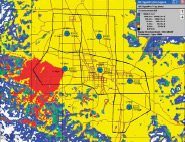
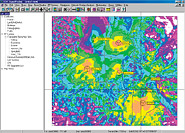
Area/Coverage Studies
A comprehensive selection of over 15 area study types are available for: |
 Shadowing/Line of Site Shadowing/Line of Site |
Percent service availability |
| Path loss |
Group-to-group interference |
| BER |
Base-to-mobile signal levels |
| Field strength |
Mobile-to-base signal levels |
| C/(I+N) & aggregate C/(I+N) |
Number of available servers |
| Received power |
Simulcast delay spread |
|
Unmatched Area Study Capabilities
Multiple area studies can be simultaneously calculated, displayed, and stored for future use. For maximum flexibility, you can create your own customized “Hybrid” studies with an easy-to-use dialog box that assists you in applying mathmatical functions to existing area studies or doing Boolean “and/or” comparisons of two existing studies. You have complete control of your study displays. |
Full Point-to-Point Path Analysis
Calculate a full microwave path analysis including path profile, rain and fade outage, percent availability, dispersive fade margin, antenna diversity reception, and cross-link interference. All links are bi-directional, and you can edit your link studies by selectively adding trees, buildings, or terrain elevation modifications. |
| |
 |
The Network Design Module, an add-on module to EDX® SignalPro®, gives you a feature-rich, carrier-class, wireless network planning tool. It is ideal for all stages of network design – from initial deployment through network maturity, with special emphasis on automatic processes and capacity and interference issues. Included in the Network Design Module is a specific feature set for designing Multipoint Systems. The Network Design Module also includes specific feature sets for Mobile and Nomadic Systems and WCDMA/UMTS Systems.
True Multipoint Analysis
The Multipoint Systems features of EDX’s Network Design Module add the ability to do true point-to-multi-point analysis with hub stations serving a set of Customer Premise Equipment (CPE), each with independently defined RF parameters and geographical locations. It is not a “grid” analysis simulating multipoint. Only true multipoint studies can provide simultaneous uplink/downlink or TDD system analysis.
These multipoint studies are in addition to the included area-wide studies showing line-of-site, signal, and interference analysis for large areas. |
| |
Automatic
System Layout
Automatically lay out your cell sites within your
system using criteria such as fixed hexagon grids
with adjustable cell service radius. |
System
Operating Parameters
You have full control over system operating parameters
including handoff and all relevant CDMA parameters.
Designing your system is easy and intuitive. |
Overlay
Systems
It’s easy to set up and study overlay systems
with mixtures of different technologies at each
cell sector (i.e. AMPS + TDMA or GSM + GPRS).
Sectors can be grouped together for easy overlay
traffic planning and analysis. |
PN
Offset
Comprehensive PN offset planning makes assignments
to avoid co-offset and adjacent offset confl icts
using real sector service areas. |
EDX
3D Pathloss Surface
Unique EDX 3D “Pathloss Surface” approach
explicitly stores sector specific measured pathloss
values instead of model prediction values. |
|
|
Automatic
Frequency Planning
Automatically set up your frequency planning using
standard or user-defi ned channel plan templates.
Select EDX’s simulated annealing algorithm
for optimum channel assignments or utilize your
own algorithm via an external DLL. |
Traffic
Loading
Calculate traffic loading on individual sectors
based on real service areas and a selection of
multiple service types. You can generate a report
on sector loading or use the information for channel
assignment calculations. |
Circuit-Switched
Circuit-switched traffic distribution with QoS
based on blocking percentage and average call
length. |
Packet-Switched
The packet-switched traffic distributions include individual control of multiple service mixes such as voice, e-mail, web browsing, audio streaming, and video streaming. |
|
 Click here to find out more Click here to find out more
|